Code status
Isekai: Waifu Overlord promo codes
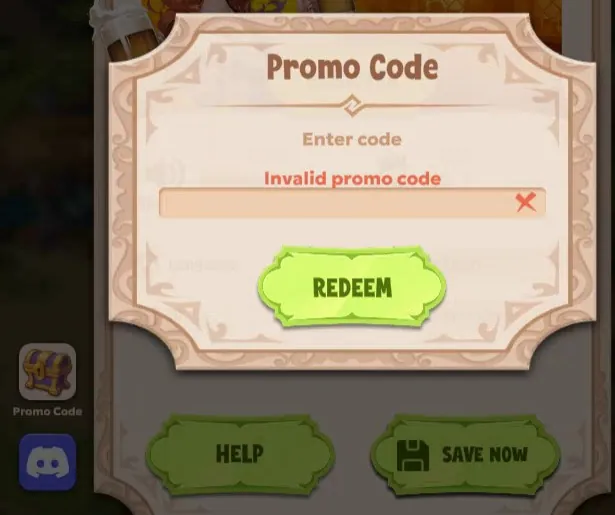
There is no published promo code for Isekai: Waifu Overlord right now: the developers have not released one in the game's Steam announcements, on Nutaku or on the publisher's Bluesky account. The game does have a code field — tap the gear icon at the top right, open Settings, press Promo Code, type the code into “Enter code” and press REDEEM. The code “Waifu” that turns up in searches belongs to a different game.
Page updated:
How to redeem a code
The code field sits in the game's Settings window:
- Tap the gear icon at the top right of the screen.
- In Settings, press Promo Code — the treasure-chest button on the left side of the window.
- Type the code into the “Enter code” box.
- Press REDEEM.
A wrong or mistyped code returns “Invalid promo code”. When the developers do publish a code, look for it in their own channels: the game's Steam announcements and its Discord server (Settings has a Discord button too).
Free rewards without a code
Summon tickets, gems and hammers come in without any code. What each of them is for is on the gameplay page.
- Free daily bundle. Under Deals, one bundle a day costs nothing: 1 summon ticket, 1 paw ticket for the pet summon and 50 hammers for the anvil.
- Apostle's Tasks. Daily, weekly and monthly lists — log in, summon a girl, water the farm, win a dungeon — fill reward chests at 30, 60 and 100 points.
- Battle Pass free track. Stars from tasks raise the pass level, and the free track pays out without buying the premium pass.
- E-mail registration. The game starts on a guest account; registering with an e-mail address and a password in Settings comes with a reward.
- Tutorial. The tutorial's task chain hands out summon tickets, hammers and gems step by step.
- Events. Limited events in the browser version have their own pass with a free track.
- Account-wide gifts. Past gifts reached every player with nothing to type in: 20 Summon Tickets with the Story Map Update on April 24, 2026, and 200 Gems in the in-game bank with the Fair Update on April 30, 2026.
The events behind these dates are listed on the news page.
Generators and mod APKs
A code generator cannot produce a code the developers never issued. Such pages tend to end in a survey, an app install or a login form — never type your Steam or Nutaku password anywhere but Steam or Nutaku.
“Mod” APKs that promise unlimited gems are altered apps from unknown parties, and they ask for install rights on your phone. The Android version to use is the APK on Nutaku's own listing; every route to the game is on the download page.
No code needed to start
The game is free to play, and the browser version starts right away on a guest account. Adults only, 18+.
Questions and answers
Are there any working Isekai: Waifu Overlord codes right now?
No. The developers and the publisher have not published a code in the Steam announcements, in Nutaku's news for the game or on the publisher's Bluesky account, and none came with the Steam release on September 25, 2026 (see the release date page). Past giveaways went to every account without a code.
Where do I enter a promo code?
In the game's Settings. Tap the gear icon at the top right, press Promo Code (the treasure-chest button on the left of the Settings window), type the code into “Enter code” and press REDEEM. A wrong code shows “Invalid promo code”.
Is the “Waifu” code real?
It is a real code for a different game. It was posted in a July 14, 2026 thread on the publisher's Bluesky account as a gift for Wet Wealth, not for Isekai: Waifu Overlord.
I found a code on another site. Should I try it?
Trying it costs nothing: the Promo Code field tells you straight away, and a code that does not work returns “Invalid promo code”. Just never give anything to get one — a Steam or Nutaku password, a survey, an app install. The developers have not published any code so far, so a list of “working codes” elsewhere does not come from them.
Where will new codes be announced?
In the developers' own channels. One is the game's Discord server, announced on Steam on September 24, 2026; Settings has a Discord button next to the Promo Code field. The other is the game's Steam announcements. A published code goes at the top of this page.
Your village is waiting
Free to start in the browser — no download, no install. Adults only.